System Designing Sub-Query RAG Pipeline

CSE Student & a Passionate Coder
Ever asked a chatbot a complex question and got a half-baked answer?
That’s because your single query didn’t give the AI enough angles to explore.
👉 Enter the Sub-Query RAG Pipeline — a smarter approach that splits one messy query into multiple smaller queries, fetches more context, and then merges it into a detailed, accurate response.
What is a Sub-Query RAG Pipeline?
Normal RAG: AI searches documents directly based on the user’s query.
Sub-Query RAG: AI first expands the query into multiple related questions (sub-queries), fetches results for each, and then combines them into a stronger answer.
💡 Think of it like asking not just one question, but also the follow-up questions you didn’t even think to ask.
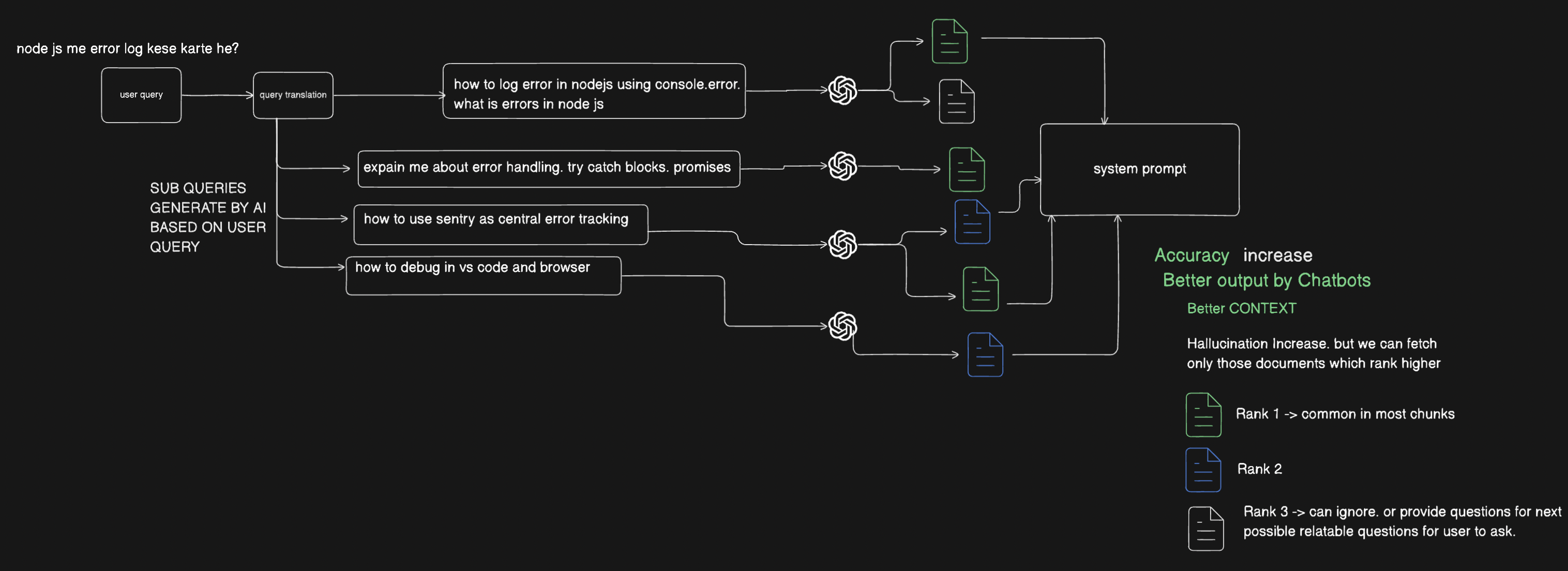
Why Do We Need Sub-Query RAG?
Users often ask vague, incomplete, or very broad questions.
Instead of relying on one weak query, AI generates sub-queries for:
Error handling details
Debugging methods
Tools for tracking errors
More sub-queries = Better context = Better answers.
How the Sub-Query RAG Pipeline Works (Step-by-Step)
Let’s break it down:
User Query Input
- Example: “Node.js me error log kese karte he?” (How do we log errors in Node.js?)
Query Translation
- AI rewrites the query into a clearer version:
“How to log errors in Node.js using console.error? What are errors in Node.js?”
- AI rewrites the query into a clearer version:
Sub-Query Generation
Based on the rewritten query, AI creates sub-queries like:
Explain error handling (try/catch, promises)
How to use Sentry for central error tracking
How to debug in VS Code and browser
Embedding & Chunk Matching
- Each sub-query is converted into embeddings and matched against documents.
System Prompt Aggregation
AI collects the best-ranked chunks (Rank 1, Rank 2)
Ignores or reuses lower-ranked chunks (Rank 3) to generate follow-up suggestions
Final Answer
- The AI merges all sub-query results → provides a comprehensive, multi-angle answer.
Benefits of Sub-Query RAG
✅ Accuracy Increase → More context leads to better results.
✅ Better Output by Chatbots → Smarter, well-rounded answers.
✅ Better Context → Avoids shallow responses.
⚠️ Downside:
Hallucinations may increase if irrelevant sub-queries are generated.
But by ranking results (Rank 1, 2, 3), we can filter only the most reliable chunks.
Real-World Analogy
Imagine you ask a teacher: “How do I fix errors in coding?”
A normal answer might be short: “Use console.log.”
A smart teacher (Sub-Query RAG) would break it down:
Here’s how errors work in general
Here’s how to use try/catch
Here’s how debugging tools help
Here’s how advanced tools like Sentry track errors
👉 The teacher gives you a complete guide instead of a one-liner.
